This is a rather big update to the ProximityLock and I decided to make the blog post instead of just a changelog entry. Also I wanted to explain a few configuration settings and how they affect detection and reliability. So here is what was introduced or changed since 1.19.1 release (2026-06-07).
As an experiment (huh) I won’t be using AI to write/edit this text.
Problems and solutions
One of the biggest problems for myself and for many users is the "sudden signal loss". And the main reason for that is (presumably) power savings on the iPhone, Watch and in Mac itself. My main setup is the MacBook Pro and Mac mini, both sitting on my desktop and iPhone on wireless charging stand right there close to them. So basically iPhone is like 30 cm (or 1 ft) away from both devices.
And quite often I see the following pattern, both Mac mini and MacBook lock the screen (or run away shortcut) at the same time. I tend to have terminal with the logs streaming opened from the app and once unlocked I see that on both computers my iPhone just stopped reporting signal level. This wasn't that bad a year ago if my memory serves me right at least for my devices. Maybe my iPhone battery has degraded or maybe new iOS is more aggressive and throttling bluetooth radio more often. Nevertheless, this is very annoying to say the least. Also I don't see this with my Amazfit Helio Strap, at least not that often.
So I decided to adjust application state machine a bit and implement a few workarounds to make things work more reliably (hopefully). At the end of the day the main idea of the ProximityLock is to lock the screen based on proximity.
First workaround is to maintain active connection to the monitored device. Along with the passive listening ProximityLock now also keeps bluetooth connection open to the device (e.g. iPhone) to actually get signal level (enabled by default). I was avoiding to implement this for quite some time, mostly due to battery consumption considerations, it does increase it of course, not so much though, but still. This can be turned off. But there are other reasons why you may want to disable active connection signal polling: during my daily use I noticed sound degradation while using my AirPods (its getting kinda choppy or robotic) during the calls in Google Meet or MS Teams (yes, unfortunately), it's not that bad, but certainly noticeable. It happens if iPhone is monitored by ProximityLock and at the same time iPhone is used for the Google Meet call (so the call is happening on iPhone, not on Mac). There is a switch in Advanced Settings that disables active connection mode. I recommend to test both ways, active and passive.
Another workaround is a bit tricky. When enabled, it will completely skip away action if signal was lost abruptly/suddenly. Just like in a situation when iPhone is on the same desktop as MacBook but shows no signal. Implementation is somewhat complex and simple at the same time, when there is no signal measurements coming, instead of just declaring iPhone absent ProximityLock first checks if signal has had some gradual degradation (like in a situation when device is really going away) and if there is no degradation internal state won't be changed to absent state, away action won't be run and screen won't be locked. This is optional because there are risks for missing real away events. But this improves experience if you are willing to take this risk. I added this feature (optional too) in ProximityShortcuts app (my another app, very similar, but distributed in App Store) some time ago. But there is no direct lock screen function in ProximityShortcuts app so risk is smaller for missing away event. Now we have this option in ProximityLock as well at user's discretion.
To be honest I was fighting with this (and some other things) for quite sometime (since the start of development actually) and app got quite a bit of spaghetti code during the development to cover different edge cases unfortunately. So I decided to expose these settings to the users, despite the side effects. At first I was thinking lets go the “Apple way”, but I think better be honest with the users. All that is a fundamental “flaw” of how BLE works in general and in macOS/iOS in particular.
Android devices monitoring
Now something really new: Android devices monitoring.
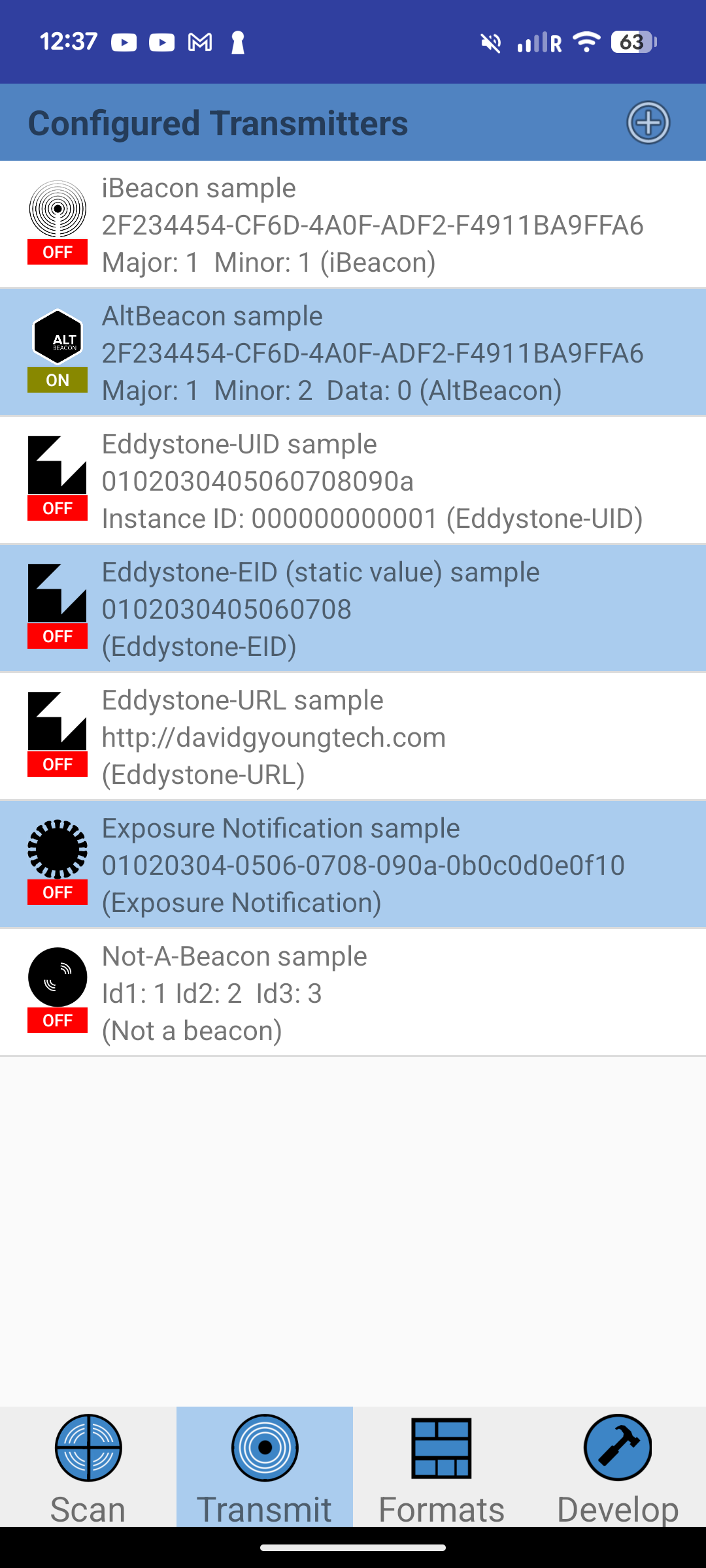
Android phones don’t transmit BLE beacons, unlike iPhones or many other bluetooth devices. But there is a workaround. I went with AltBeacon. In order for signal monitoring to work Android phone needs this app installed: Beacon Scope https://play.google.com/store/apps/details?id=com.davidgyoungtech.beaconscanner There are probably other apps that can emulate and emit beacons, but this is the one I use and test on my Google Pixel.
Here is the AltBeacon transmitter enabled in Beacon Scope
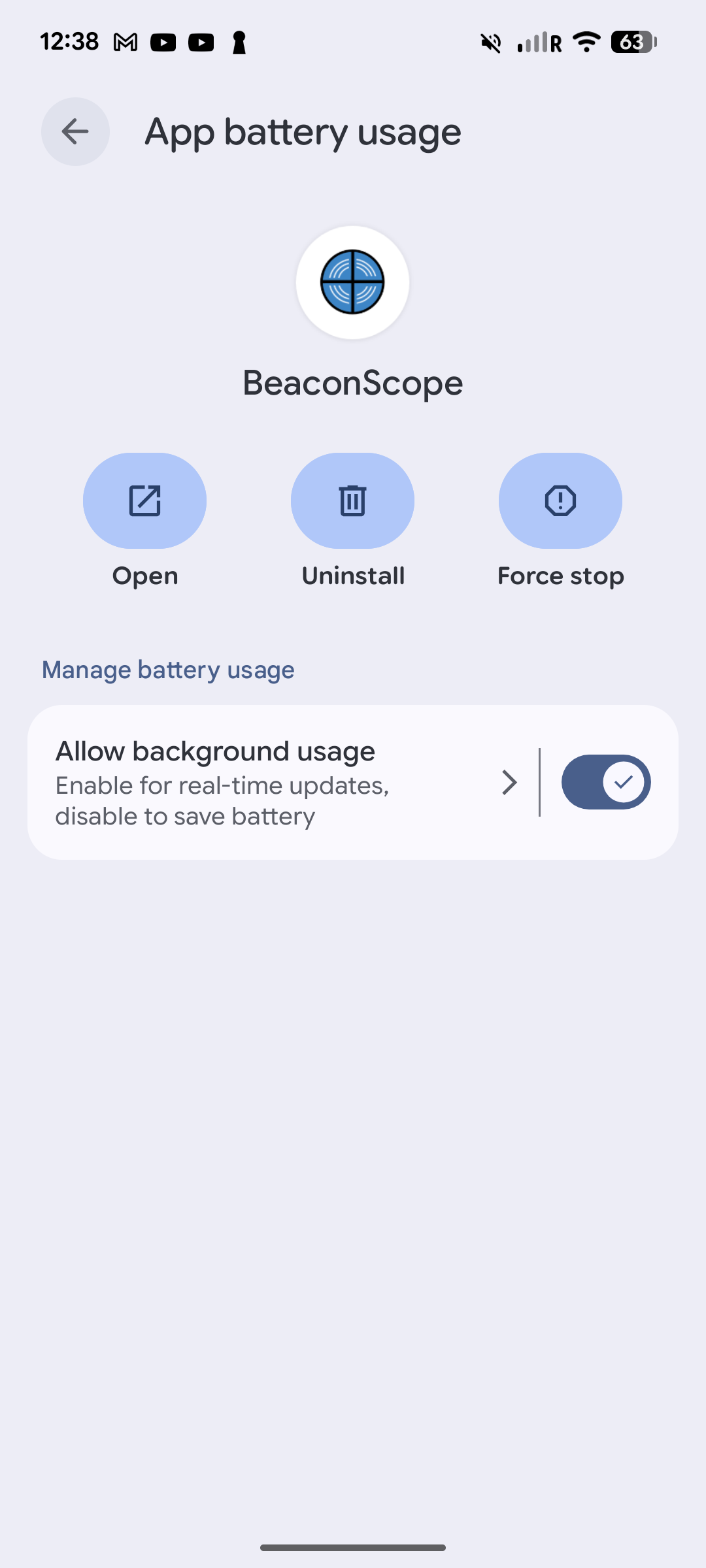
In order to work properly you have to allow background usage for this app
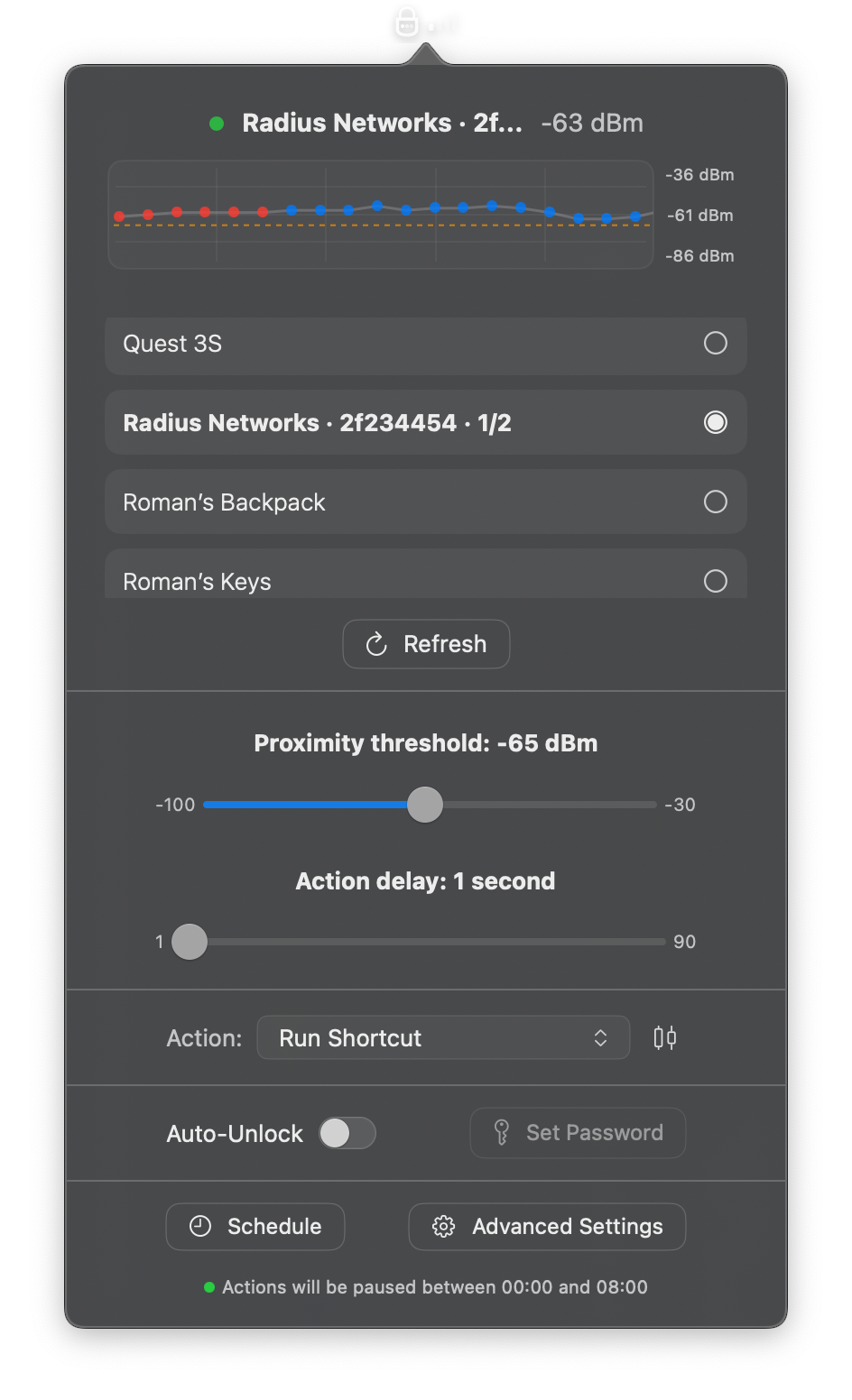
And here is the example how the beacon is detected by ProximityLock
macOS Golden Gate
macOS 27 has introduced some changes here and there during the beta. This is kind of a Whac-A-Mole. But almost every beta is like that plus or minus. I hope it settled down now. Testing, however, became harder. ProximityLock tested to support Sequoia (macOS 15), Tahoe (macOS 26) and Golden Gate (macOS 27) right now. I had to get external SSD for my Mac mini and install different versions there and reboot every time. (side note: prices for storage these days are ridiculous).
A few more things
- Signal dots on signal graph now change colors depending on the device state.
- Auto-unlock password entered in fragments now with screen lock state check in between to avoid typing and leaking the password somewhere if screen was unlocked in flight manually.
- Unlock password can be tested now from app just by pressing the test button.
- Shortcuts can now be tested too - there is a test button right near the shortcut name input.
- Signal graph polished a bit visually.
- This one might be noticeable and change how app behaves sometimes, if you see false away actions try to change modes to adjust: Kalman preferences tuned for Responsive / Balanced / Stable modes.
Advanced settings
Here is the overview for the so called Advanced Settings:
- Enable PIN - this pin protects the app, without pin settings can’t be opened. (I noticed some users forget this pin after some time, so be careful. Although the pin can be reset, just send me an email)
- Notification - self explanatory I believe. It shows notification when Mac is about to lock.
- Detection mode - Kalman filter preferences. Mostly self explanatory. Changes the reaction speed but with some caveats.
- Hysteresis return offset - this one is when iPhone is not very close to the Mac, for example you are sitting on the couch nearby and signal fluctuates around threshold. Signal always fluctuates which may lead to constant lock/unlock, which is annoying. Hysteresis helps a bit here, signal should pass over this extended band over the threshold in order to lock or unlock. You can enable this to show this band on signal chart.
- Ignore sudden signal loss - new feature, explained above in this post.
- Passive listening mode - new feature, also explained previously in this post.
- Relock and Unlock cooldown - this also to help fight signal fluctuations around threshold and to complement Hysteresis return offset.
- Activity monitoring - this is also to prevent sudden signal loss and signal fluctuation false positive locks/unlocks. It monitors mouse and keyboards activity and depending on the duration set it postpones the lock action. This one is using official macOS api and it doesn’t see what was typed on the keyboard or where the mouse is exactly on the screen, just the fact they are active.
- There are also two self explanatory buttons at the bottom to reset the settings.
Defaults
Settings that work for me most of the time:
Proximity threshold: -65dBm, Action delay: 1 second, Signal processing: stable, Return offset +6dBm, Away offset -4dBm, Ignore sudden signal loss is enabled, Relock and unlock cooldowns set to 1 second usually, Activity monitoring is 30 seconds.
“Pet peeves?”
Recently I got an email from user asking for help that app doesn’t lock their Mac. And when I saw the screenshot I was like: WTF? Well, there is now another app in App Store (released in April this year) which is called Proximity Lock as well. This is different app and works a bit different under the hood it seems. I’m not sure how author missed that my app website is ranking very high in google and chat bots for proximity lock keywords. I think to contact the author and ask about changing the name. I understand author is using this name for better ASO (App Store optimization) but it’s actually bad for users.
Why it is mostly bad for users? Confusion and frustration.
Also ProximityLock is not my only work and project. App sales are mostly covered the expenses like hardware (basic Mac mini on discount from Amazon, for example but before pricing hike) and Apple developer subscription and then I get some leftovers for coffee and ice cream after that, but nothing really serious. But I live in Europe and these kind of money in some other countries could have been considered good enough probably. Well, also I might be lazy or maybe the days where you can make some decent money being an indie developer are gone. Or maybe niche is too narrow. I don’t know. It is what it is. I guess subscription model could have made more money, but there is nothing in this app that justifies subscription aside from the continuous support and development. But still it motivates me to continue to work on this project(s), I’m not sure if I was able to keep working on this if it was open source project though.
PS: As I said this post is experimental, hand crafted without AI. Excuse me for any mistakes or typos, I’m not a native English speaker.
Questions, suggestions? Reach me out at [email protected] or at discord https://discord.gg/udA6rQX8JH