 ProximityLock
ProximityLock Keep Your Mac Secure, Automatically
Forgetting to lock your Mac? ProximityLock (Proximity Lock) is a Mac menu bar app that monitors your iPhone, Apple Watch, Android phone, or another compatible Bluetooth device and locks your Mac when you leave.
14-day free trial. No subscription.
$14.99 one-time purchase, plus applicable taxes
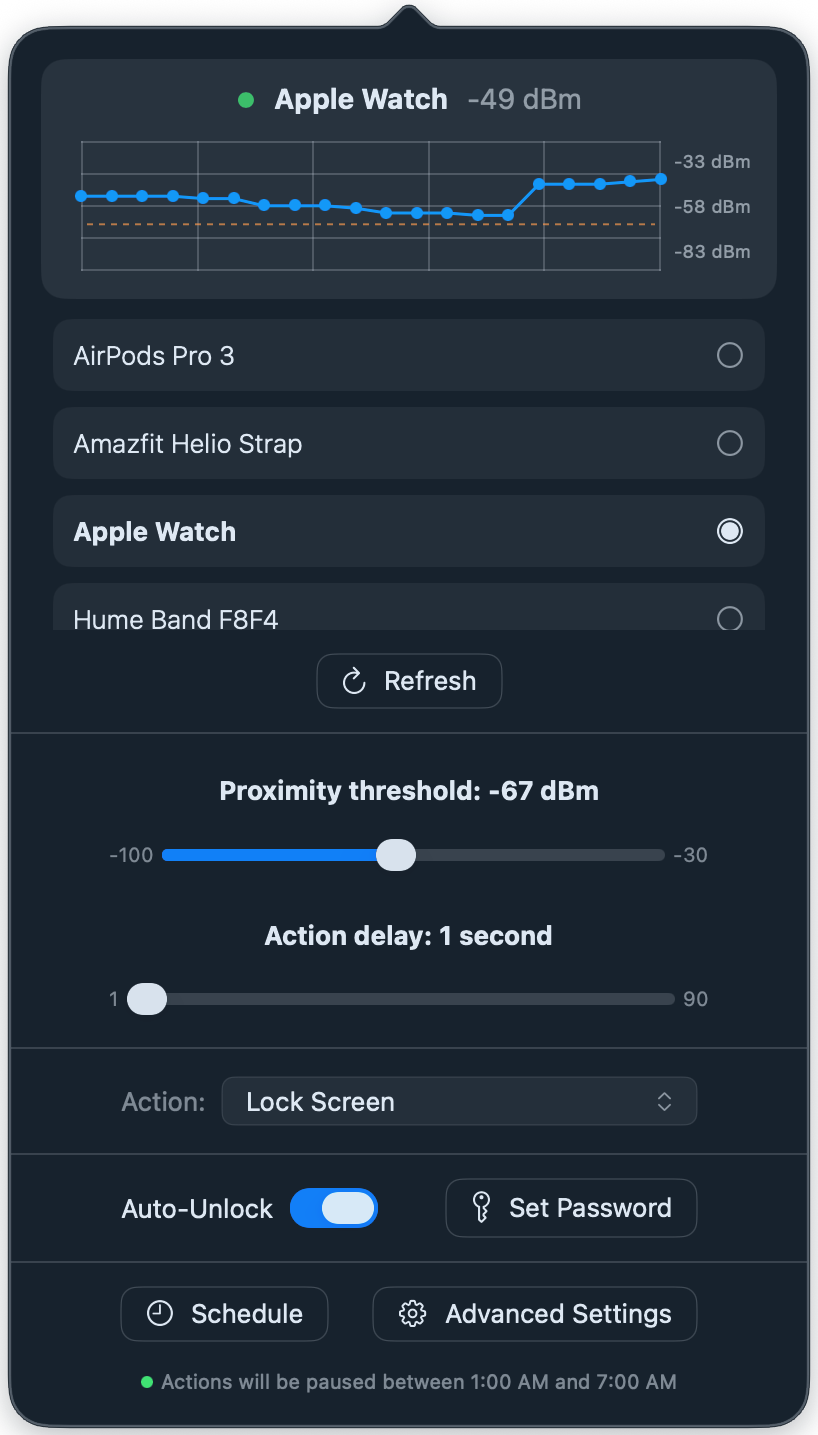
If you’re using Android, you’ll need separate app to broadcast AltBeacon. On your iPhone, you don’t need to install anything in order for ProximityLock to work.
Actions when you leave or come back
Automatic locking
Lock your Mac or start the screen saver when your selected Bluetooth device moves out of range.
macOS Shortcuts
Run separate shortcuts when your device leaves and returns.
Auto-Unlock
Unlock your Mac automatically when your device returns, or wait until you use the keyboard, trackpad, or mouse.
You can also enable touch-to-unlock when macOS locks your screen automatically or you lock it yourself, even without Touch ID. Your selected device needs to be nearby.
Requires Accessibility permission and your login password saved in macOS Keychain.
Controls
Live signal graph
See your device’s Bluetooth signal on a live graph alongside the proximity threshold. You can also see the current signal strength next to the menu bar icon.
Lock-screen status (experimental)
See device status and signal strength in a small widget on the lock screen.
Activity monitoring
Wait until you stop using the keyboard or mouse before running the away action. This allows sudden signal fluctuations without triggering the away action while you’re still using your Mac.
Scheduled hours
Set the hours when actions run or when they pause.
Wi-Fi-based geofencing
Pause actions on selected Wi-Fi networks, or allow actions only on those networks.
PIN-protected settings
Require a PIN to open settings, disable monitoring, or quit.
Sounds on away and return
Select sounds for when the app detects you leaving or returning.
Launch at Login
Start ProximityLock automatically after you turn on or restart your Mac and log in.
Advanced settings
Signal smoothing.
Choose how much to smooth the Bluetooth signal with Responsive, Balanced, or Stable Kalman filtering.
Bluetooth signal readings.
When enabled, “Request more signal readings” makes the macOS Bluetooth stack report each broadcast from the monitored device. “Filter burst readings” can improve signal smoothing by deduplicating readings received in a burst.
Separate away and return thresholds.
Set separate signal thresholds for when you leave and come back. The gap between them (the hysteresis dead band) gives the signal some room to vary before an action is executed. You can optionally see this gap on the graph.
Action delay.
Set how long to wait before the device is considered away.
Lock and unlock cooldowns.
After your Mac unlocks, let it wait before locking again. Set another delay for unlocking after a lock.
Activity threshold.
Set how long to wait after you stop using the keyboard or mouse before running the away action.
Sudden signal-loss handling.
Choose whether a strong Bluetooth signal suddenly disappearing should count as leaving.
Passive listening only.
Listen for your device’s Bluetooth broadcasts without connecting to it. You might want to try this if you notice stability issues with Personal Hotspot or Bluetooth audio.
Reset detection settings.
Restore the default signal filtering, thresholds, delays, and cooldowns. Keep your selected device, PIN, schedule, and shortcut names.
Security & Privacy
ProximityLock is signed with an Apple Developer ID and notarized by Apple, which checks it for malicious code.
Bluetooth monitoring runs locally on your Mac. The app goes online for license activation and updates. Update checks include a hashed device identifier and your license status.
Auto-Unlock is optional and requires Accessibility permission. Your login password is stored in macOS Keychain.
Download ProximityLock from this official website only. After activating your license, you can use tools such as Little Snitch to block network access and install future updates manually.
Prefer the Mac App Store? ProximityShortcuts has the same proximity detection but only uses macOS Shortcuts.

Frequently Asked Questions
Why can't I see my iPhone or Apple Watch in ProximityLock?
Your Mac and iPhone or Apple Watch need to be signed in to the same Apple Account (Apple ID).
Why isn’t ProximityLock on the App Store?
ProximityLock uses a private macOS API to lock the screen, which App Store rules don’t allow. ProximityShortcuts is available on the App Store and runs shortcuts when you leave or come back. You can set up those shortcuts to lock your Mac or start the screen saver. proximityshortcuts.app
How does ProximityLock work?
ProximityLock uses your selected device’s Bluetooth Low Energy (BLE) signal to estimate whether it’s nearby. When you leave, it can lock your Mac, start the screen saver, or run a shortcut. You choose the action and adjust the signal threshold in settings.
Can ProximityLock unlock my Mac?
Yes. Auto-Unlock can unlock your Mac automatically when your device returns, or wait until you use the keyboard, trackpad, or mouse.
You can also enable touch-to-unlock when macOS locks your screen automatically or you lock it yourself, even on a Mac without Touch ID. Your selected device needs to be nearby.
Auto-Unlock is optional and requires Accessibility permission. Your login password is stored in macOS Keychain.
Where does Auto-Unlock store my password?
Your login password is stored in macOS Keychain. ProximityLock types it into the lock screen when Auto-Unlock runs. Auto-Unlock is off by default, and you can replace or delete the saved password in the app.
Is ProximityLock secure?
ProximityLock is signed with an Apple Developer ID and notarized by Apple, which checks it for malicious code. Download it from this official website only.
What security features does ProximityLock include?
It can lock your Mac when your device moves out of range. You can also require a PIN to open settings, disable monitoring, or quit the app. Turning Bluetooth off can trigger a lock, depending on the last signal reading and your schedule settings.
What devices can I use with ProximityLock?
You can use an iPhone, Apple Watch, an Android device broadcasting AltBeacon, or another compatible Bluetooth LE device. Android needs a separate app to broadcast AltBeacon. If you’re using an iPhone, you don’t need a separate app on it. Android setup guide
What Mac operating systems does ProximityLock support?
ProximityLock is compatible with macOS 14 or later.
Do I need to keep the ProximityLock app open all the time?
Yes, it needs to keep running, but you can close its settings. ProximityLock runs from the menu bar. Enable Launch at Login to start it automatically after you turn on or restart your Mac and log in.
Can I adjust the distance at which my Mac locks?
Yes. Adjust the signal threshold in settings and use the live graph to see the readings as you move away. The threshold is based on Bluetooth signal strength, not a fixed distance in metres or feet.
What if my phone signal drops but I’m still at my desk?
Activity monitoring waits until you stop using the keyboard or mouse before running the away action. It’s on by default, with a 10-second wait after your last input. You can change that delay or turn activity monitoring off in Advanced Settings.
What are cooldown settings?
After your Mac unlocks, let it wait before locking again. Set another delay for unlocking after a lock. You can adjust each delay from 1 to 180 seconds in Advanced Settings.
Does ProximityLock need network access?
Bluetooth monitoring runs locally on your Mac. The app goes online for license activation, license checks, and updates. Update checks include a hashed device identifier and your license status. After activation, you can use the app offline and install updates manually.
Where is the ProximityLock menu bar icon?
If ProximityLock is running but you can’t see its icon, your menu bar may be too full. On a MacBook with a notch, some icons can be hidden behind it.
Why has my device stopped appearing in ProximityLock?
Try turning Bluetooth off and back on in Settings on your Mac and device. If that doesn’t help, restart your Mac. For Android, check that the AltBeacon app is still broadcasting.
Is ProximityLock reliable?
Bluetooth signal strength can change with distance, walls, and where you keep your device. You can use the live graph as a guide while adjusting the threshold to suit your environment. You can also fine-tune signal processing and app behaviour under Advanced Settings.
Why can't ProximityLock monitor any Bluetooth device nearby?
Not every Bluetooth device broadcasts a signal the app can keep monitoring. Some stop broadcasting when idle or change their Bluetooth address. For Android, an AltBeacon app provides a beacon identifier that stays the same when the Bluetooth address changes.
Will ProximityLock drain my device's battery?
ProximityLock uses Bluetooth Low Energy and very little CPU power, so its battery usage is low.
How much does ProximityLock cost?
There’s a 14-day free trial. After that, it’s a one-time purchase of $14.99 plus applicable taxes. No subscription.
Can I use ProximityLock with multiple Macs?
Yes, your license allows you to use ProximityLock on an unlimited number of Macs simultaneously for personal use. For organizations, please contact [email protected] for volume licensing.
Is there a money-back guarantee?
Yes, there is a 30-day money-back guarantee if you're not satisfied with ProximityLock.
How do I get help?
Email [email protected]